



.webp?width=750&height=321&name=Software%20Architecture%20for%20AI%20Systems%20-%20Patterns%2c%20Components%20and%20Design%20(1).webp)
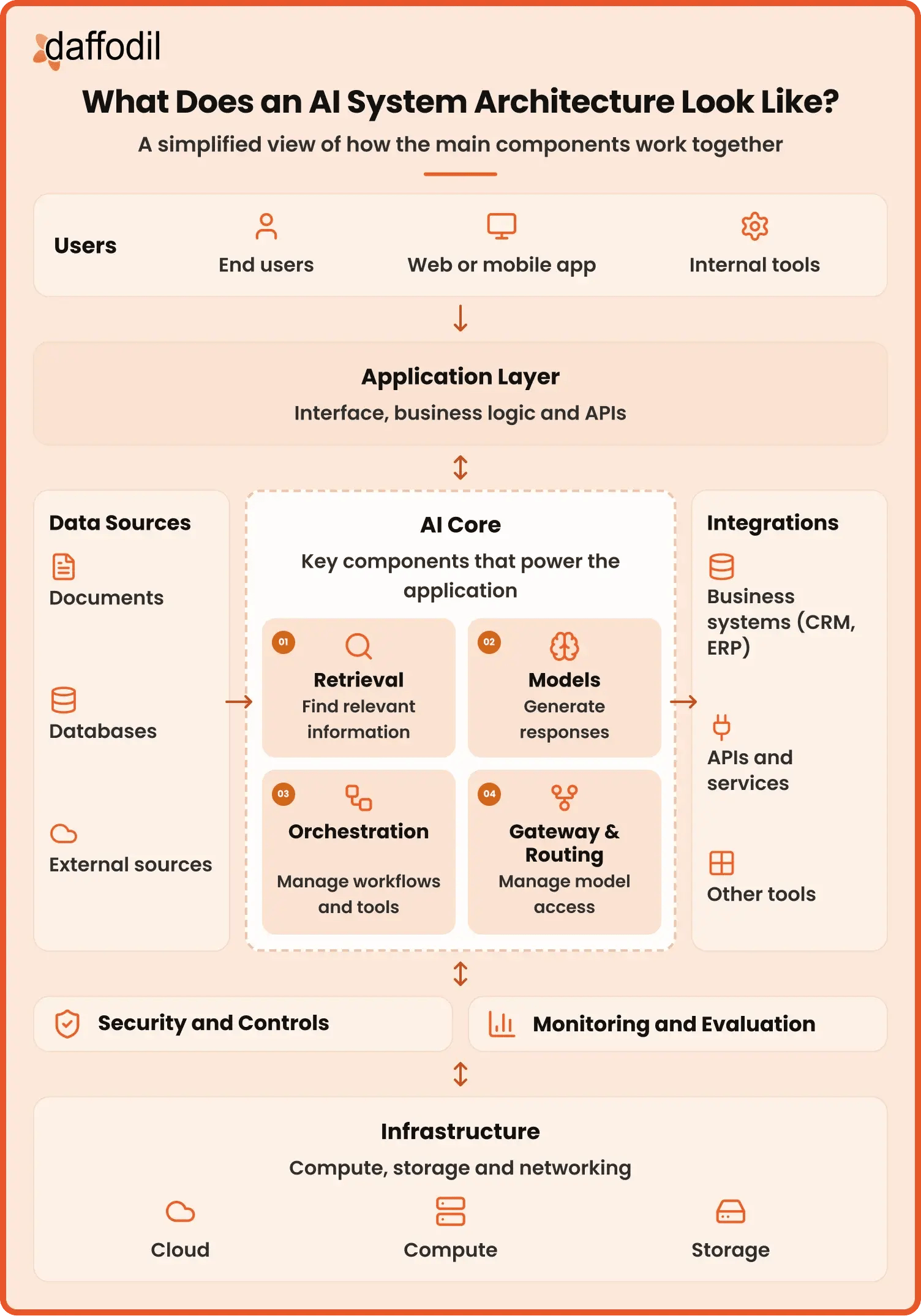
Software architecture for AI systems defines how models, data, applications, APIs, business tools, security controls, monitoring, and infrastructure work together as one system.
In this guide, we compare AI system architecture with traditional software architecture, explore common AI software architecture patterns such as RAG, AI gateways, model routing, workflows, and agents, and break down the core components behind these systems. We also cover the tools and technologies used across different layers and explain how to design software architecture for AI systems step by step, so you can choose an approach that fits your application.
This matters because getting an AI feature to work is only one part of building a real product. Once that feature needs company data, connects with existing software, serves more users, or starts performing business tasks, decisions around data access, model usage, security, response time, cost, and monitoring become much more important. A good AI architecture design brings these pieces together without making the application more complex than it needs to be. And more companies are now reaching this stage.
McKinsey's 2026 State of AI survey found that nearly 9 in 10 respondents said their organisations regularly use AI in at least one business function, while 44% reported that AI is being scaled across their enterprise, up from 38% a year earlier. This shift is also changing what technology teams need to plan for as models become part of larger products and business workflows. Our overview of the top AI trends in 2026 looks at how agentic systems, multimodal applications, and other developments are shaping the way these systems are being built.
Summary At A Glance
- Software architecture for AI systems defines how models, data, applications, APIs, business systems, security, monitoring, and infrastructure work together as one complete system.
- An AI system architecture usually includes eight core areas: application, data and knowledge, models, retrieval and context, workflows and integrations, security and controls, monitoring and evaluation, and infrastructure.
- Common AI software architecture patterns include direct model integration, RAG, AI gateways, model routing, AI workflows, and agent-based architecture. Different patterns solve different problems, and they can also be combined in larger systems.
- Designing the architecture starts with the use case and requirements, followed by planning the data and models, mapping integrations and application flows, setting security and human controls, and planning monitoring and evaluation.
- The right architecture depends on the complexity of the use case, the data the application needs, the number of models involved, integrations with other systems, security requirements, performance, cost, and expected growth.
- A simple AI feature may only need a direct connection to a model, while an enterprise application may require RAG, multiple models, business integrations, workflows, agents, access controls, and continuous monitoring.
- The best starting point is usually the simplest architecture that meets the product’s current requirements, with additional components added when there is a clear reason for them.
What Is Software Architecture for AI Systems?
Software architecture for AI systems is the overall structure that defines how an AI application's models, data, business logic, APIs, tools, security, and infrastructure work together. It provides the foundation for how information moves through the system, how the model is used, and how the application connects with users and other business systems.
An AI model is only one part of this architecture. For example, consider a customer support assistant. A customer asks a question through the application, but the model may need to find information from a knowledge base, check customer details through an API, generate an answer, and return it through the support interface. The AI system architecture defines how all these parts connect and how the request moves from one part to another.
This is why designing an AI application architecture usually involves decisions around:
- Application: Where users or other systems interact with the AI.
- Data and knowledge: What information the application can use and where it comes from.
- Models: Which model or models handle different tasks.
- Retrieval: How relevant business information is found when the model needs additional context.
- Tools and integrations: How the application connects with APIs, databases, CRMs, payment systems, or other software.
- Security and access: Who can use the system, what data it can access, and which actions it can perform.
- Monitoring: How teams track response quality, errors, usage, speed, and cost.
- Infrastructure: Where the application, models, data, and supporting services run.
These parts will not look the same in every AI system. A simple application that summarizes text may only need an application layer and a model. An enterprise assistant that answers questions from company data and performs business tasks may also need retrieval, several integrations, access controls, monitoring, and workflow management. Microsoft's current architecture pattern for AI workloads similarly explains that AI architecture should be adapted to the business goal and use case rather than treating every component as mandatory.
A good software architecture therefore does more than connect an application to an AI model. It creates a clear structure for how the complete system works today while allowing models, data sources, integrations, and product requirements to change over time.
AI System Architecture VS. Traditional Software Architecture?
Traditional software and AI systems use many of the same building blocks, such as applications, APIs, databases, security controls, and cloud infrastructure. The difference is that AI system architecture also needs to account for models, the data and context given to it, changing model outputs, and how those outputs are checked and monitored.
The table below compares the main differences between traditional software architecture and software architecture for AI systems.
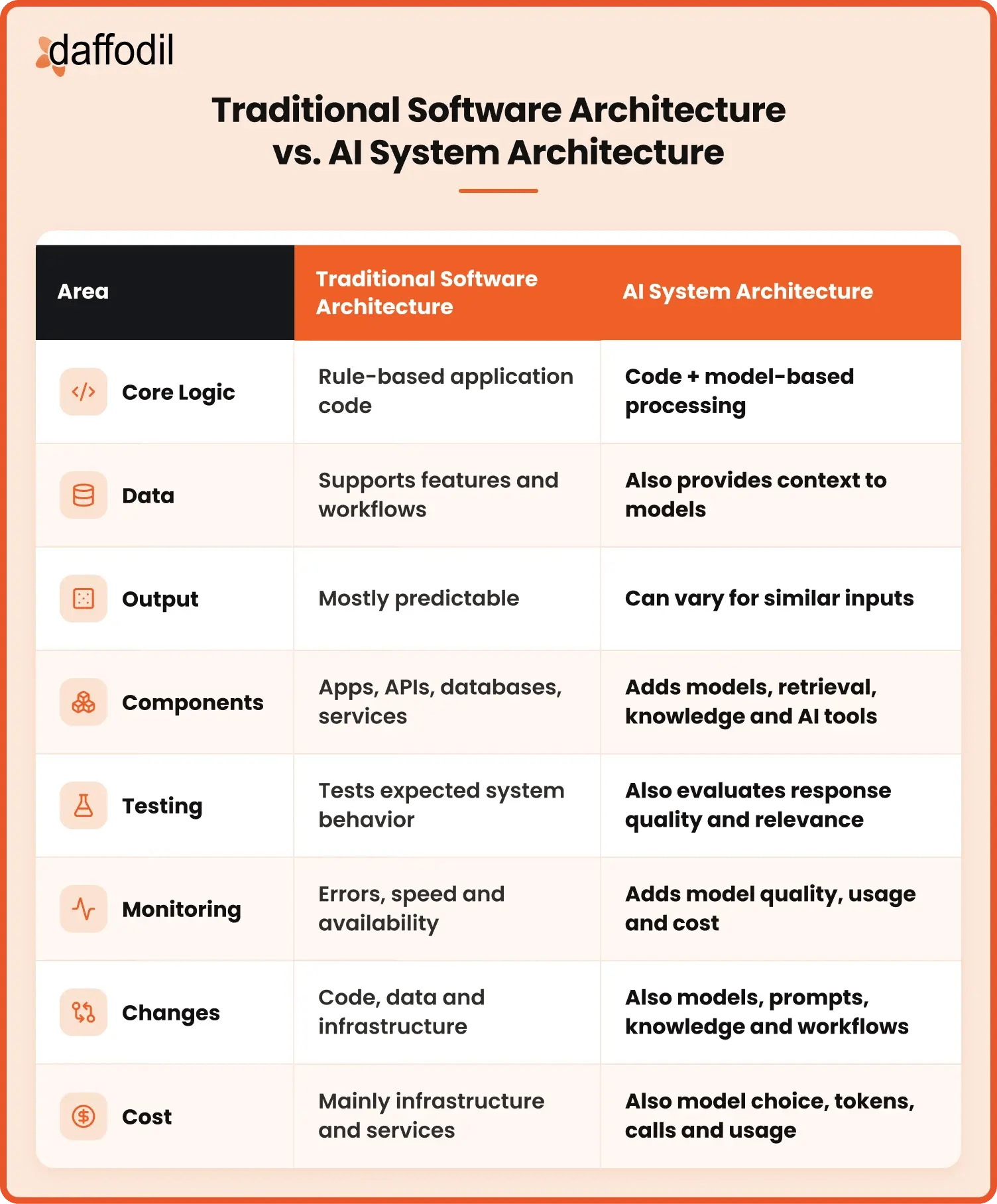
Artificial Intelligence architecture does not replace traditional software architecture. It extends it with additional components and design decisions needed to work with models, data, retrieval, tools, and changing outputs. The exact additions depend on what the AI application needs to do, so understanding the core components is the next important step in designing the system.
6 Common Software Architecture Patterns for AI Systems
Different AI applications need different ways of connecting models, data, tools, and business systems. A simple application may work well with a direct model connection, while a larger product may need retrieval, model routing, workflows, or agents. Choosing the right AI software architecture pattern depends on the task, the information the system needs, and how much control or flexibility the application requires.
Below are 6 common AI software architecture patterns and where each one fits:
| Pattern | Best For | Complexity | Relative Cost | Avoid When |
| Direct Model Integration | Single, well-defined tasks | Low | Low | The application needs private business data |
| RAG | Answers based on company knowledge | Medium | Medium | The knowledge base is small and rarely changes |
| AI Gateway | Managing multiple models or providers from one place | Medium |
Low added cost |
The application uses only one model |
| Model Routing | Workloads where different requests need different models | Medium |
Can reduce cost |
All requests need the same model capability |
| AI Workflow | Business processes with clear and fixed step | Medium-High | Medium-High | The required steps change for every request |
| Agent-Based | Complex tasks where the steps cannot always be defined in advance | High | High | The process already follows a clear sequence |
1. Direct Model Integration
Direct model integration is the simplest way to add AI capabilities to an application. The application sends a request directly to a model through an API and receives the generated result. This pattern is often a practical choice when the feature has a clear and limited task and does not need access to large amounts of business-specific information.
How it works: The application sends the user’s request directly to a model, which processes it and returns the generated result.
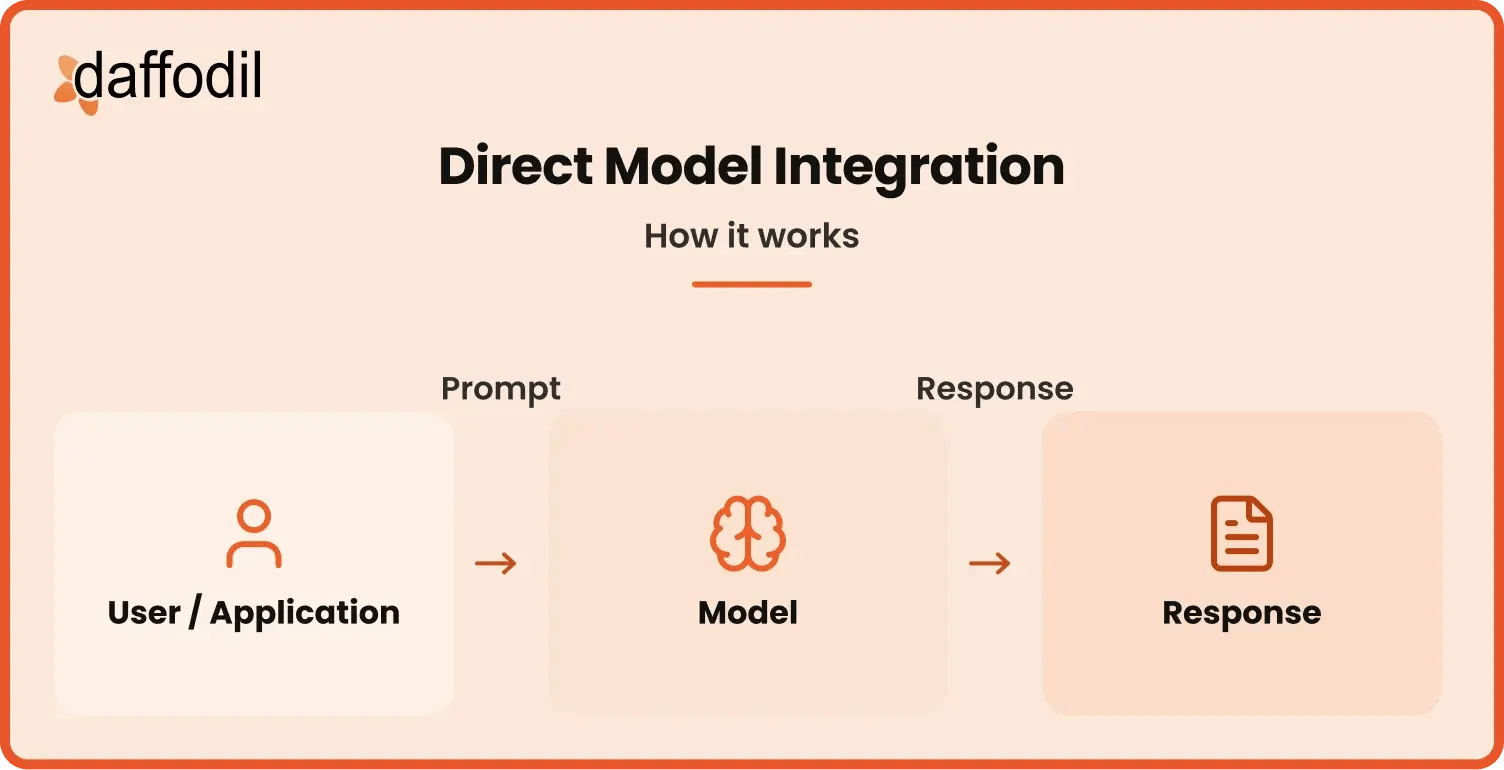
When to use it: It works well for straightforward tasks that do not require private business knowledge, several models, or complex workflows. Common uses include text summarization, rewriting, classification, and content generation.
Example: A writing application sends a piece of text directly to a model to summarize it and displays the generated summary to the user.
Advantages:
- Simple and quick to implement
- Fewer components to manage
- Lower development complexity
- Good for focused AI features
Limitations:
- Limited access to business knowledge
- Harder to manage multiple models
- Greater dependence on one model or provider
- Not ideal for complex workflows
2. Retrieval-Augmented Generation (RAG)
RAG connects a model with information outside its original training data. It allows an application to find relevant information from company documents, databases, or other approved sources before generating a response. IBM describes RAG as an architecture pattern for giving models access to specialized or private information that was not part of their training data.
How it works: The system finds relevant information from an approved knowledge source and gives it to the model as context for generating a response.
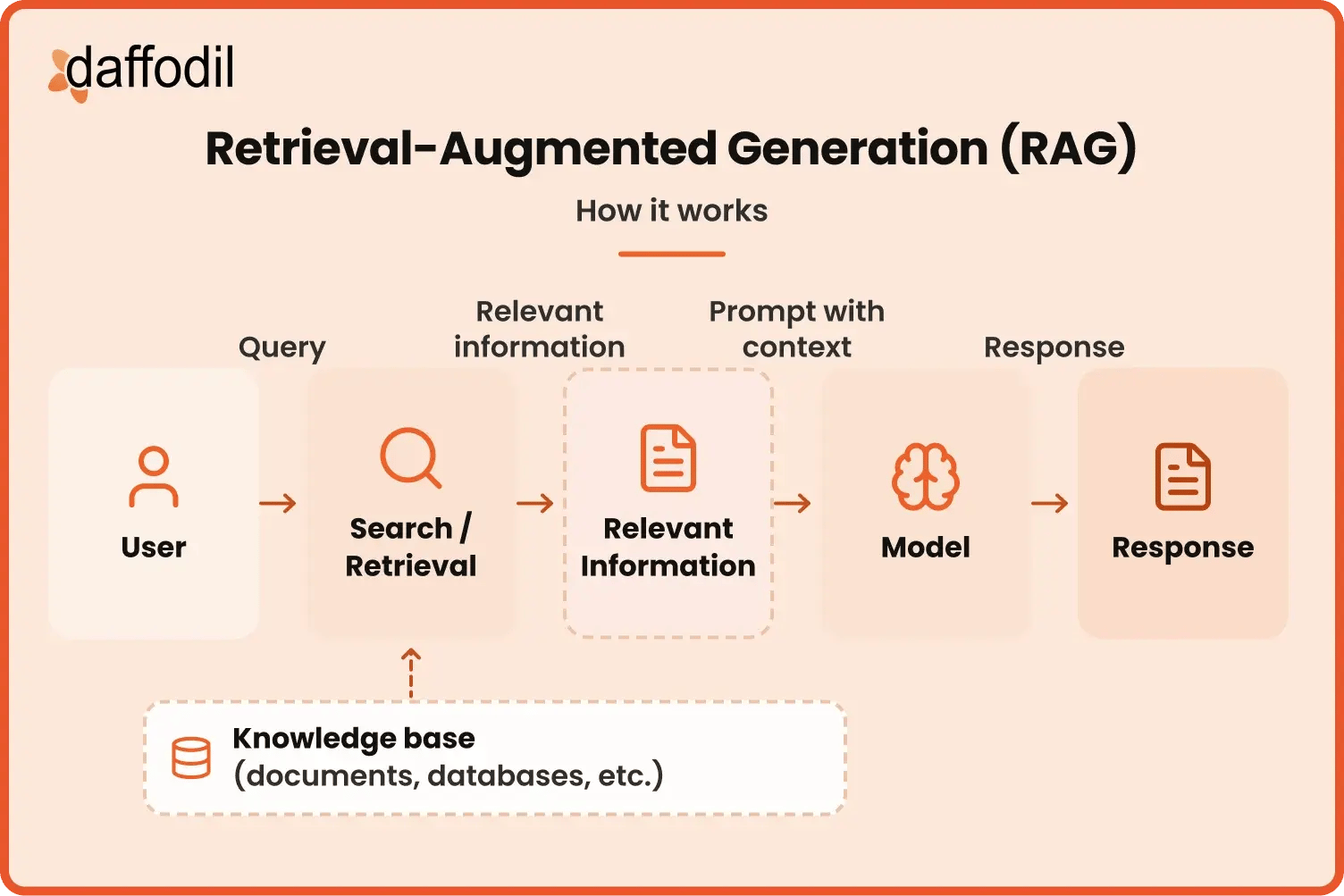
When to use it: RAG is useful when responses need to be based on private, current, or business-specific information, such as policies, product documentation, research, support content, or internal knowledge.
Example: An employee support assistant retrieves the relevant sections from current HR and company policy documents before answering an employee's question.
Advantages:
- Uses current and business-specific information
- Works with private company knowledge
- Reduces dependence on model training data
- Knowledge can be updated without retraining the model
Limitations:
- Results depend heavily on retrieval quality
- Poor source data can reduce answer quality
- Adds more components to manage
- Retrieval can add response time and cost
3. AI Gateway
An AI gateway creates a central layer between an application and the models it uses. Instead of every application connecting separately to model providers, requests pass through one controlled point. AI gateways can manage model access, authentication, usage, routing, monitoring, and other controls.
How it works: A central gateway manages communication between applications and models, helping control model access, usage, and requests.
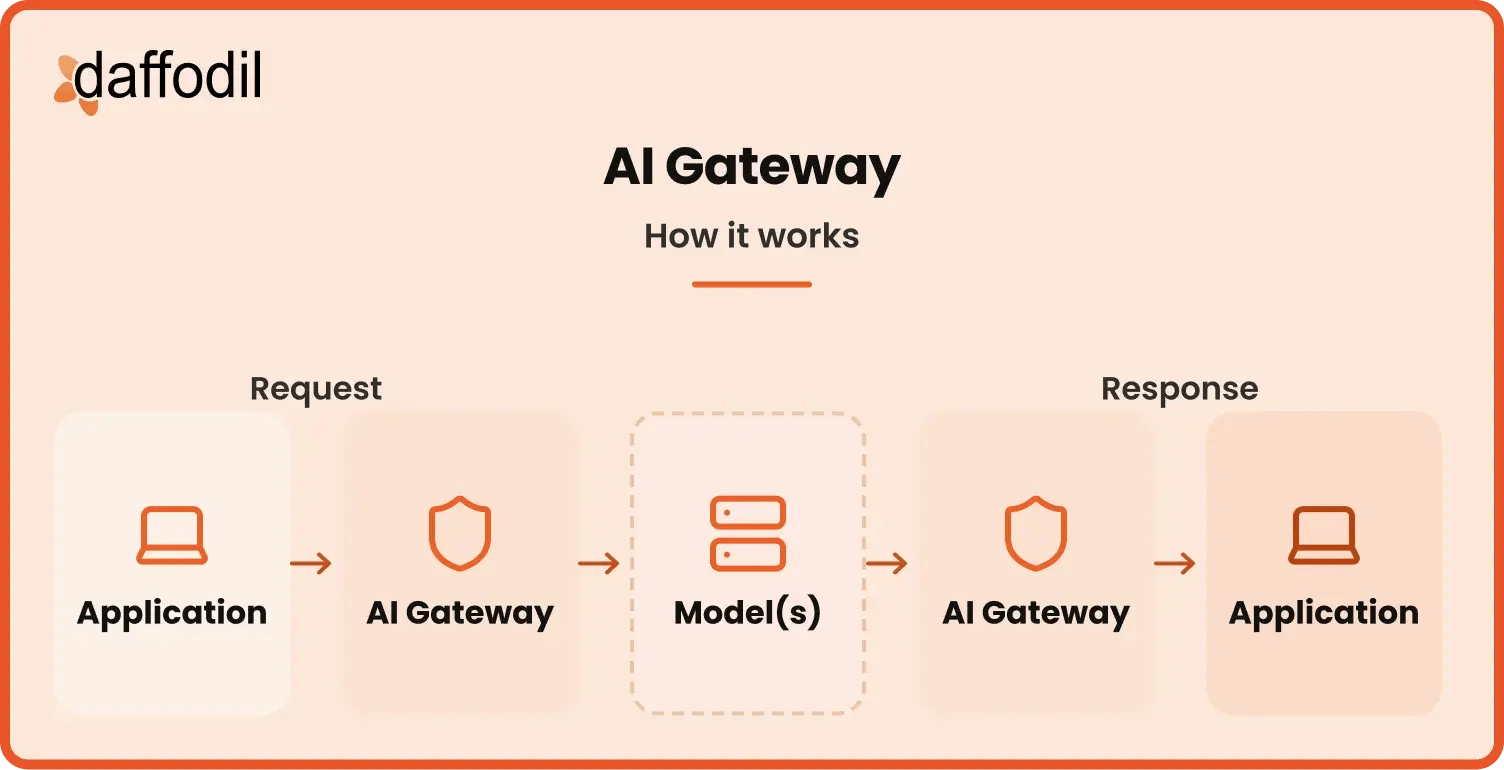
When to use it: This pattern becomes useful when an organization uses several models or providers and wants a common way to manage access, usage, security, and monitoring.
Example: A company has several internal applications using different models. All model requests pass through one gateway so the company can manage access, monitor usage, and switch between approved providers without changing every application.
Advantages:
- Centralises access to different models
- Provides better visibility into model usage
- Makes provider changes easier to manage
- Supports common security and access controls
Limitations:
- Adds another layer to the architecture
- Can increase setup and management work
- Gateway failures can affect connected applications
- May be unnecessary for simple applications
4. Model Routing
Model routing sends each request to the model that best fits the task instead of using the same model for everything. The routing decision can be based on factors such as the type of task, complexity, response-time requirement, model availability, or cost. Dynamic routing can also provide fallback options if the preferred model is unavailable.
How it works: A router evaluates each request and sends it to the model that best fits the task, based on factors such as capability, speed, or cost.
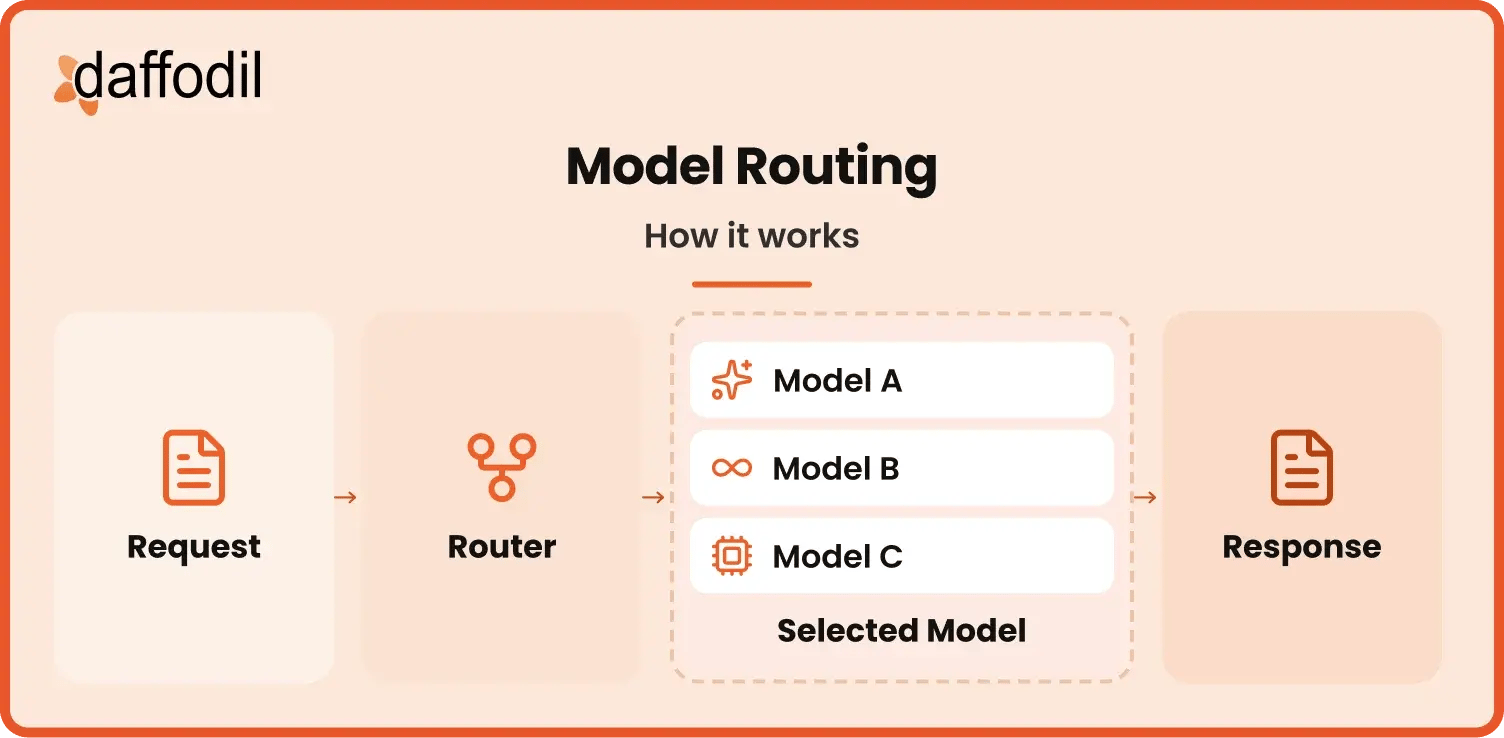
When to use it: It is useful when an AI platform architecture uses several models with different capabilities, speeds, or costs.
Example: A customer support platform sends simple request classification to a smaller model while sending complex customer questions to a more capable model.
Advantages:
- Matches models to suitable tasks
- Helps control model usage costs
- Can improve response speed
- Provides flexibility across multiple models
Limitations:
- Routing rules add complexity
- Wrong routing can affect response quality
- Requires ongoing monitoring and adjustment
- More models mean more integrations to manage
5. AI Workflow Architecture
An AI workflow architecture breaks a task into a defined sequence of steps. Models, business rules, APIs, databases, and other tools can each handle a specific part of that process.
How it works: The system follows a predefined sequence in which models, tools, and business systems handle specific parts of a task.
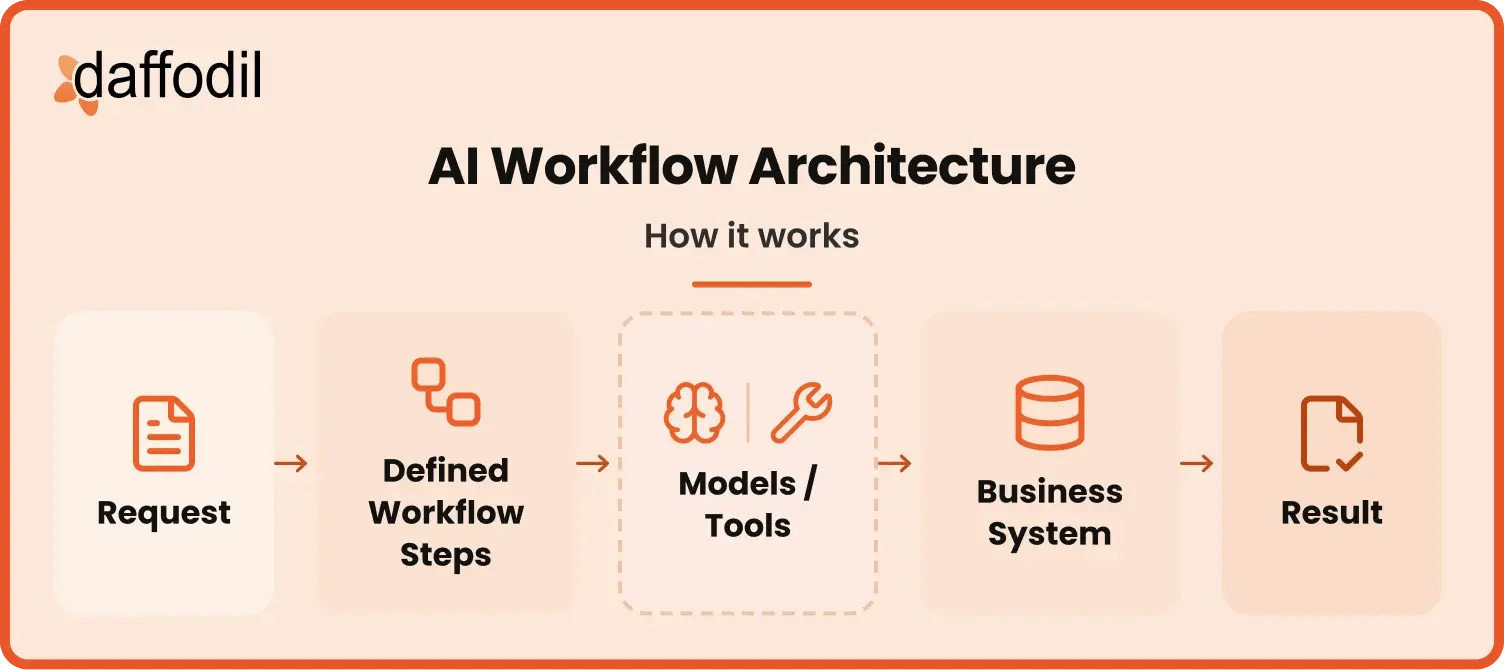
When to use it: This pattern works well when a business process has clear steps and the AI system design needs more control over what happens and in what order.
Example: An insurance claim workflow could extract information from submitted documents, check required details, compare them with policy information, create a claim summary, and send it to an employee for review.
Advantages:
- Keeps task steps clearly defined
- Provides greater control over the process
- Makes individual steps easier to monitor
- Supports human approval at important stages
Limitations:
- Fixed flows offer less flexibility
- Complex workflows can become difficult to maintain
- One failed step can affect the complete process
- Changes may require updating several connected steps
6. Agent-Based Architecture
Agent-based architecture gives an AI agent a goal and allows it to decide which steps, tools, or information it needs to complete the task. Agents can use models, company data, APIs, and other tools as part of this process. More complex systems can also use multiple agents for different tasks.
How it works: An agent works out how to complete a request, chooses the required models, data, or tools, and carries out the necessary steps.
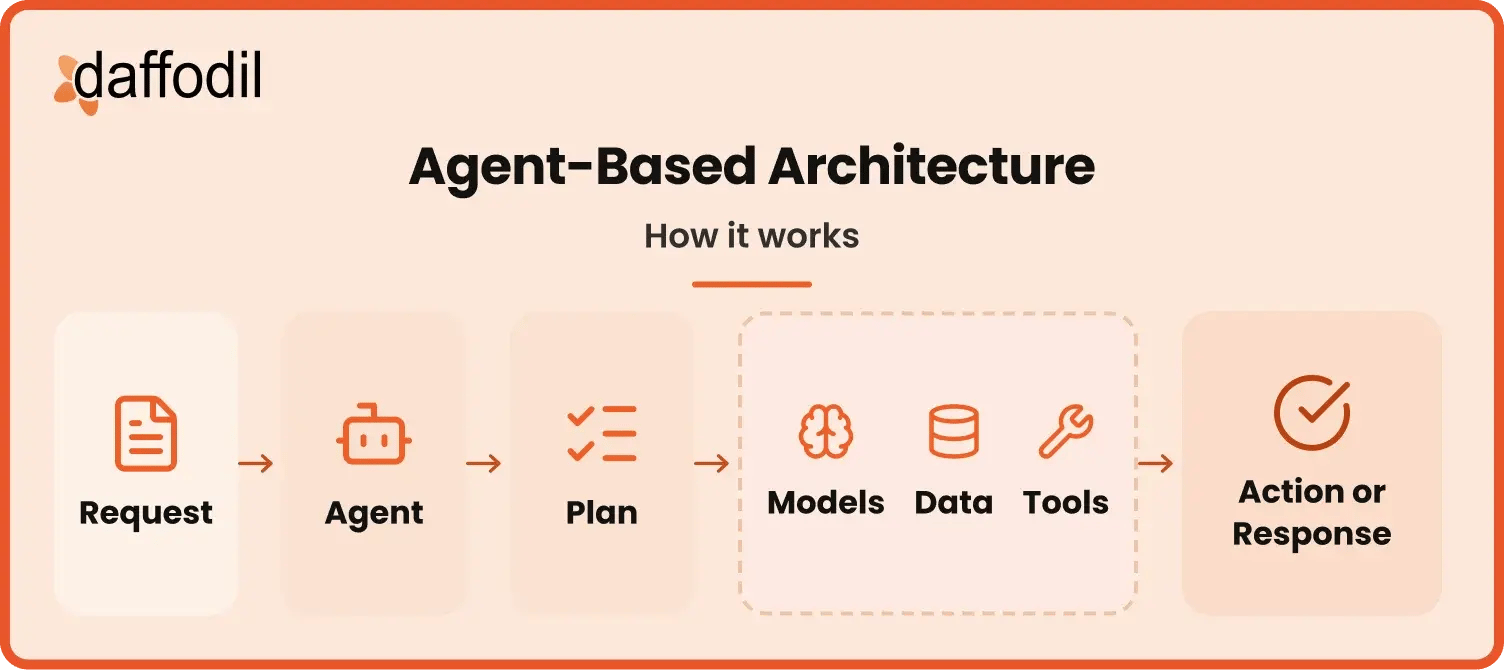
When to use it: Agent-based architecture is better suited to tasks where the exact sequence of steps cannot always be defined in advance and the system needs some flexibility in deciding how to complete the task.
Example: A procurement agent could review a purchase request, collect supplier information from approved systems, compare available options, check company purchasing rules, and prepare a recommendation for the procurement team.
Advantages:
- Handles complex, multi-step tasks
- Can choose tools based on the task
- Adapts its steps as the situation changes
- Can work across several business systems
Limitations:
- Behavior can be harder to predict
- Requires stronger monitoring and testing
- Needs strict limits on data and tool access
- Can increase model usage and operating costs
Also Read: LangGraph, CrewAI and AutoGPT which breaks down which framework suits which kind of agent workload.
These AI software architecture patterns are not always used separately. A production system might use RAG for business knowledge, an AI gateway for model access, model routing for cost control, and an agent for selected workflows. The right approach is to start with the simplest pattern that meets the use case and combine patterns only when the application has a clear reason to do so.
Core Components of an Artificial Intelligence Software Architecture
A well-planned Artificial Intelligence software architecture connects more than an AI model with an application. It needs a clear way to handle user requests, business data, models, external systems, security, monitoring, and the infrastructure that keeps everything running.
The following 8 components provide a useful way to understand how the complete system works.
1. Application Layer
The application layer is the part of the AI application architecture that users or other software interact with. It could be a customer support portal, mobile app, search interface, analytics dashboard, internal business tool, or an AI feature added to an existing product.
Its role is not limited to displaying a model's answer. This layer receives requests, collects any information the user provides, sends that information to the right part of the system, and presents the final result in a form that makes sense for the user. It can also handle functions such as login, file uploads, user preferences, conversation history, and feedback.
Example: Consider an insurance claims application. A claims manager could upload a claim document and request a summary of the important details. The application layer handles the document upload and the user's request. The work of reading the document, finding relevant information, and creating the summary happens through other parts of the architecture before the result returns to the same interface.
Also Read: See how AI for UI design automation can help product teams speed up interface design, prototyping, validation, and the handoff from design to development.
2. Data and Knowledge Layer
The data and knowledge layer provides the information an AI software needs beyond the model's existing knowledge. Depending on the application, this could include product catalogs, policy documents, customer records, transaction history, manuals, contracts, support articles, research reports, or information stored in company databases.
This layer matters because many business applications need answers based on the company's own information rather than general knowledge. The information also needs to be current, relevant, and available only to people or systems that are allowed to use it. Data quality is equally important. Connecting a powerful model to outdated product information or incomplete customer records will not make those problems disappear.
Example: An AI assistant for an investment firm may need to work with approved research reports, client information, market data, and internal investment policies. These sources may be stored in different places, but the AI application design needs a clear way to make the right information available when a task requires it.
3. Model Layer
The model layer is where the main AI processing takes place. Models can be used to understand text, generate content, summarize documents, classify information, analyze images, extract details, make predictions, or support decisions depending on the product.
An AI software architecture can use one model or several models. A customer service platform, for instance, could use a smaller model to classify incoming requests and a more capable model for complex questions that require detailed reasoning. A separate model could process images or documents when the application supports those formats. The model layer needs to be considered alongside cost, response time, quality, privacy, and the type of task being handled. A larger or more capable model is not automatically required for every request.
Example: Consider an insurance claims platform. A text model could read and summarize claim descriptions, a document model could extract information from invoices and policy documents, and an image model could help review photos submitted with a claim. Each model handles the task it is best suited for, while the application brings the results together for the claims team.
4. Retrieval and Context Layer
The retrieval and context layer helps the model receive the information that is most useful for the current request. The data and knowledge layer may contain thousands or millions of documents and records, but sending all of that information to a model for every request would be slow, expensive, and often unnecessary.
This layer searches the available knowledge and selects the information that is relevant to the task. That information can then be provided to the model as context before it creates a response. Retrieval-augmented generation (RAG) is one common way of doing this. The quality of retrieval can be just as important as the model itself. If the system retrieves the wrong document or misses an important piece of information, the final answer can still be poor.
Example: In one of our own projects, a knowledge assistant worked well during testing against a few hundred documents and degraded noticeably once the document set grew past several thousand. The model had not changed and there were no errors in the logs. The retrieval step was returning technically related documents that were not the right ones for the question asked. The fix was not a larger model but better chunking and a reranking step in the retrieval layer. This is a common pattern: retrieval problems surface as model problems, and teams often spend weeks on the wrong layer.
Also Read: How Daffodil Integrated Conversational AI and Semantic Search into a Digital Health Platform
5. Workflow and Integration Layer
The workflow and integration layer connects the AI parts of the application with the systems where business work actually happens. These may include CRMs, payment platforms, ERP systems, inventory tools, databases, email services, search systems, or company APIs.
It also controls how a task moves from one step to another. Some tasks follow a fixed sequence, while more advanced applications may decide which tool or data source is needed based on the request. This layer becomes particularly important when moving from an AI feature that only generates information to an application that can support or perform business tasks.
Example: Consider a procurement application that helps a purchasing team review a new supplier. The system may need to collect supplier information, check records in an internal database, review submitted documents, compare the information against company rules, and prepare a summary for an employee. The model handles only part of this process. The workflow and integration layer coordinates the complete flow and connects each step with the required business system.
6. Security and Control Layer
The security and control layer defines what the AI application is allowed to access and what it is allowed to do. This becomes especially important when the system works with customer information, financial records, internal documents, or business applications that can make real changes.
Security in AI software architecture design includes user access, data permissions, protection of sensitive information, control over external tools, and records of important system activity. The architecture should make sure that a user cannot gain access to information simply because the AI application is connected to it.
Example: An AI assistant used by a bank may be allowed to retrieve transaction information and prepare a response for a service representative. Changing customer details, approving a payment, or closing an account could require human approval before the action is completed.
7. Monitoring and Evaluation Layer
The monitoring and evaluation layer helps teams understand what happens after the application is being used in the real world. Normal software monitoring remains important, including system errors, response time, availability, and failed API calls. Teams may therefore need to track response quality, failed requests, retrieval results, model usage, token consumption, cost, tool activity, and user feedback. What needs to be measured depends on the purpose of the application.
Example: An AI assistant used to search legal documents could remain online with no technical errors while gradually returning less relevant information because the underlying document collection has changed. Traditional uptime monitoring would show that the application is healthy, but evaluation of the responses could reveal the actual problem.
8. Infrastructure Layer
The infrastructure layer provides the computing, storage, networking, databases, and cloud or on-premises resources required to run the complete Artificial Intelligence architecture. A product that uses models through an external API may have very different requirements from a company that hosts and runs its own models. Applications that process large amounts of data, images, or video may also require more computing resources than a simple text-based assistant.
This layer should therefore be planned around expected usage, response-time needs, storage, availability, cost, and how the application may grow. Red Hat’s guide to production-grade enterprise AI systems explains that production AI infrastructure can include computing resources, model storage, model serving, and connections with existing business systems.
Example: If an e-commerce company introduces an AI shopping assistant, usage during a major sale could be many times higher than on a normal day. The system needs to handle that increase without making every part of the architecture unnecessarily expensive during quieter periods.
Tools and Technologies Used in AI System Architecture
The tools used in an AI system architecture depend on what the application needs to do. A simple product may only need a model API and the existing application stack, while a larger system may need separate technologies for retrieval, orchestration, security, monitoring, and model management.
Common technology categories include:
- Models: Hosted model APIs, open-weight models, and specialized models for text, images, speech, or document processing.
- Retrieval and context: Vector databases, embedding models, hybrid search, document indexing, and chunking tools that help applications find relevant information for RAG and other knowledge-based features.
- Workflow and orchestration: Workflow frameworks, agent frameworks, job schedulers, event queues, and orchestration tools that coordinate models, APIs, tools, and business processes.
- AI gateways and model routing: AI gateways, model routers, API management, caching, and fallback mechanisms for managing access to one or more models.
- Data: Data warehouses, databases, object storage, ETL tools, and streaming pipelines for collecting, storing, and preparing information used by the application.
- Security: Identity and access management, secrets management, role-based access control (RBAC), encryption, data masking, and redaction tools.
- Monitoring and evaluation: LLM observability, tracing, evaluation frameworks, logging, and application performance monitoring tools for tracking both system performance and the quality of AI outputs.
- Infrastructure: Cloud computing, containers, Kubernetes, GPU infrastructure, serverless services, storage, networking, and content delivery technologies.
Architecture tools support how the system runs, while development tools support the engineers building and maintaining it. For the development side, see our guide to the best AI coding tools in 2026 and how different tools can fit into different stages of the engineering workflow.
5 Steps to Design Software Architecture for AI Systems
Designing software architecture for AI platforms is about deciding how the complete application will work, not simply where an AI model will sit. The architecture needs to connect the use case with the right data, models, business systems, security controls, and infrastructure while also considering how the product will be monitored and changed over time.
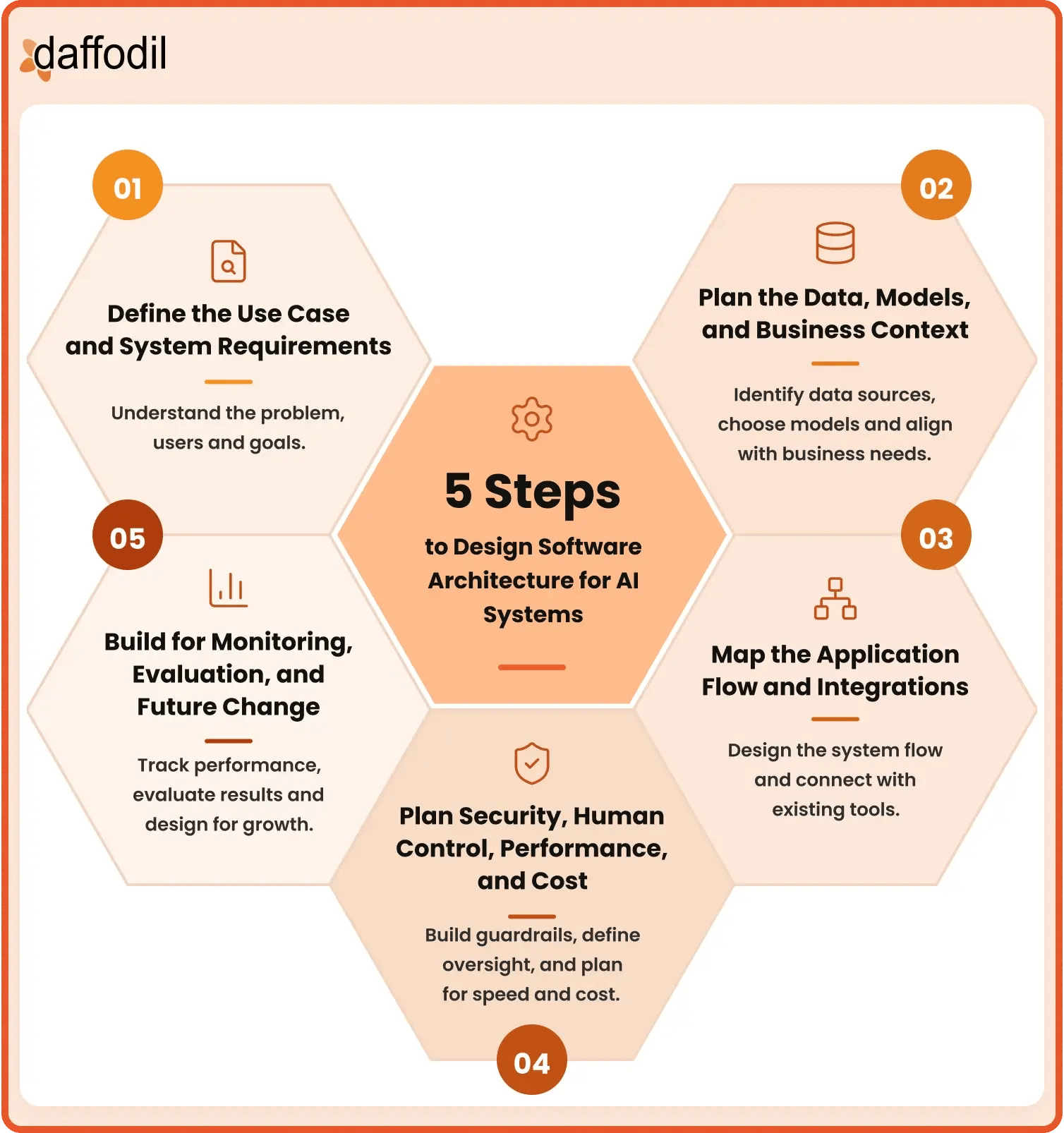
The following 5 steps bring these decisions together without making the software architecture design more complex than it needs to be.
Step 1: Define the Use Case and System Requirements
Start with a clear understanding of what the AI system needs to accomplish. Define who will use it, what problem it will solve, what information users will provide, and what result the application should return. The architecture for a system that summarizes documents will be very different from one that can access business systems and perform actions.
It is also important to define the level of responsibility the system will have. The more responsibility the system has, the more attention the AI system design will need around security, approvals, monitoring, and error handling.
At this stage, teams should also document practical requirements such as expected number of users, response time, availability, privacy needs, and any industry or regulatory requirements. The NIST AI Risk Management Framework similarly recommends defining the system's intended purpose, users, business goals, requirements, expected benefits and costs, and the level of human oversight needed.
Step 2: Plan the Data, Models, and Business Context
Once the use case is clear, identify the information the application needs to complete the task. This may include documents, databases, customer records, product information, transaction history, images, or information from external services.
For each important data source, determine:
- Where the information comes from
- How often it changes
- Whether its quality is good enough
- Who is allowed to access it
- Which parts the AI application actually needs
The next decision is how models will be used. One model may be enough for a simple application, while a larger system may use different models for tasks such as classification, document processing, image analysis, or generating responses. Model choice should consider the task, response quality, speed, privacy, and cost rather than assuming the largest model is always the best option.
The AI application architecture also needs a clear way to provide business context to these models. If the application needs current company information, a retrieval approach such as RAG can find relevant information when a request is made. Smaller amounts of fixed information may be provided directly. The goal is to give the model the information required for the task without giving it unnecessary access to data or sending large amounts of unrelated information with every request.
Step 3: Map the Application Flow and Integrations
The next step is to map how a request moves through the complete system. A basic AI software architecture might follow a simple flow:
User → Application → Relevant Data → Model → Response
A business application may have several additional steps, such as checking the user's identity, retrieving information, calling a model, connecting with another business system, requesting approval, and then completing an action. Mapping this flow makes it easier to see where each component belongs and what information passes between them. It also shows which existing systems need to be connected. These could include databases, CRMs, ERP platforms, payment systems, document stores, search tools, or external APIs.
Integrations should be planned around the exact access the application requires. A system that only needs to read an order status should not automatically receive permission to modify or cancel the order. The flow should also account for failures. If required data cannot be found, a model is unavailable, or another system does not respond, the application needs a defined way to handle the situation instead of simply stopping or returning an unreliable result.
Step 4: Plan Security, Human Control, Performance, and Cost
Security needs to be part of AI architectural design from the beginning. Define who can use the system, which data each user can access, which tools or business systems the application can reach, and what actions it is allowed to perform. Sensitive information should be protected throughout the flow, and access should be limited to what is actually required for the task. Human control should be based on the impact of an action. A low-risk task, such as organizing internal documents, may require little supervision. Actions involving payments, account changes, legal decisions, or sensitive customer information may need an employee to review or approve them before they are completed.
Performance and cost need to be considered at the same time. Model calls, the amount of information sent with each request, external APIs, retrieval, and multi-step workflows can all add time and cost. Teams should estimate expected traffic, peak usage, acceptable response times, and how frequently different models or services will be called. Not every task needs the largest model or the most complex workflow. Using smaller models for simpler tasks, retrieving only relevant information, reusing repeated information, and avoiding unnecessary model calls can help keep the system responsive while controlling costs.
Daffodil's article on Building Token-Efficient AI Architecture for Applications explains these approaches in more detail, including retrieval, prompt caching, model routing, memory management, and controlling unnecessary model usage.
Step 5: Build for Monitoring, Evaluation, and Future Change
An AI software architecture design is not complete when the application goes live. Teams also need a way to understand how the system performs with real users and whether it continues to produce useful results. Traditional software measures are still important, but AI applications may require additional checks. Depending on the use case, teams can monitor:
- System availability and response time
- Failed requests and API calls
- Response quality
- Retrieval quality
- Model and token usage
- Cost per request or workflow
- Tool and integration failures
- User feedback
Monitoring should connect back to the goal defined in Step 1. For example, if the application was designed to extract information from documents, teams need to measure whether the correct information is being extracted rather than only checking whether the application is online.
These 5 steps help turn AI architectural design into a practical process: define what the system needs to achieve, plan the data and models around that goal, map how everything connects, build in the right controls, and then monitor how the system performs in real use. The result should not be the most complex architecture possible, but one that supports the product's current needs while leaving room for it to grow.
How to Choose the Right Architecture for Your AI System
Choosing the right AI system architecture does not mean selecting the most advanced pattern available. The architecture should match what the product needs to do, the information it needs, the systems it connects with, and the level of control the business requires. In many cases, starting with a simpler architecture and adding more components as the need becomes clear is easier to manage than designing a complex system from the beginning.
When comparing different AI software architecture patterns, consider the following factors:
1. Use Case Complexity
Start with the task the application needs to complete and how many steps are involved. A feature that summarizes a document, classifies a request, or generates a short response may work well with direct model integration. There may be little value in adding retrieval, routing, or agents if the task can already be completed reliably with a simpler setup.
The architecture needs can change as the task becomes more complex. If the application has to collect information from different sources, use several tools, follow business rules, or complete multiple steps before producing a result, a workflow-based or agent-based approach may be more suitable. The key is to match the architecture to the complexity of the task rather than making the task fit a preferred architecture.
2. Data and Knowledge Requirements
Consider what information the model needs to produce a useful result and where that information comes from. Some applications can work mainly with the information provided in the user's request. Others depend on current product information, internal documents, customer records, policies, research, or other business knowledge.
When large or frequently changing knowledge sources are involved, a retrieval approach such as RAG can help find the relevant information before the model generates a response. The architecture should also consider how often the data changes, how reliable it is, and which users are allowed to access it. These requirements can affect the need for retrieval, data storage, access controls, and connections with existing databases.
3. Number of Models and Providers
A simple AI application architecture may use one model for all of its tasks. As the product grows, however, different tasks may be better handled by different models. One model might be suitable for simple classification, another for detailed reasoning, and third for processing images or documents.
When several models are involved, teams need to decide how requests will reach the right one. Model routing can select models based on the task, cost, speed, or other requirements. An AI gateway can provide a central point for managing access to different models and providers. These patterns become more useful as the number of models and applications grows, but they can add unnecessary complexity when only one model is required.
4. Integration and Action Requirements
Another important question is whether the system only needs to return information or whether it needs to work with other business applications. Many enterprise AI systems connect with databases, CRMs, ERP platforms, payment services, inventory systems, document stores, or internal APIs.
The type of integration can influence the architecture. A support assistant that only reads order information has simpler requirements than one that can update an address, cancel an order, or start a refund. If tasks follow a known sequence, an AI workflow architecture can provide clear control over each step. If the system needs to decide which tools and steps to use based on each request, an agent-based architecture may be more appropriate.
Teams should also consider what happens when an integration fails. The architecture needs a clear way to handle missing data, unavailable services, or incomplete actions without allowing the rest of the workflow to continue incorrectly.
5. Security and Risk
The level of security should reflect the type of data the application handles and the impact of the actions it can perform. An internal writing assistant and an application connected to customer financial accounts should not have the same level of access or control.
Consider what information the system can read, which users can access that information, what tools it can use, and which actions it can perform. Higher-risk tasks may need stronger access controls, detailed activity records, additional testing, and human approval before an action is completed.
6. Performance and Cost
Software Architecture choices directly affect how quickly the application responds and how much it costs to operate. Using larger models, sending long inputs, retrieving information from several sources, making multiple model calls, or running long agent workflows can all increase response time and cost. Teams should consider expected user volume, peak traffic, acceptable response time, model usage, infrastructure requirements, and the number of external services involved.
Cost can also influence model and pattern choices. Simple requests may be handled by smaller models, while more capable models can be reserved for complex tasks. The goal is to balance response quality, speed, and cost based on what each task actually requires.
Different architecture patterns also add different levels of cost and response time:
- Direct model integration: Lowest overhead with a single model call.
- RAG: Adds retrieval and usually more input tokens.
- AI gateway: Adds a small routing layer but can help control usage through caching.
- Model routing: Adds a routing step but can lower cost by sending simpler tasks to smaller models.
- AI workflows: Cost and response time increase as more steps require model calls.
- Agent-based architecture: Most variable because one task may involve several model calls, tools, and retries.
7. Future Changes and Growth
The architecture should work for the current product while leaving reasonable room for future changes. Models and providers may change, new data sources may be added, business systems may be replaced, and an AI feature may eventually support more users or tasks.
This does not mean building every possible capability from the beginning. Instead, important parts of the AI software architecture should have clear boundaries so they can be changed without affecting the whole application. For example, replacing a model should ideally not require rebuilding the user interface, retrieval system, and every business integration.
Ultimately, choosing the right software architecture for AI systems comes down to balancing these requirements. A simple use case may only need direct model integration, while a larger enterprise application may combine RAG, an AI gateway, model routing, workflows, or agents. The best approach is to start with what the product actually needs and introduce additional AI software architecture patterns only when they solve a clear problem.
Conclusion
The right software architecture for AI systems should be built around what the product actually needs. A simple application may only require a model and a few integrations, while a larger system may need business data, RAG, multiple models, workflows, agents, security controls, and continuous monitoring.
If you are planning to build a new AI system or improve the architecture of an existing application, Daffodil’s software engineering services can help you plan the architecture, connect the right technologies, and move the product from design to production.
The goal is not to add every available model, tool, or architecture pattern. Start with a clear use case, choose the components that solve a real need, and build enough flexibility into the AI system architecture to support new data, models, integrations, and product requirements as they change.